God of Wins Mobile Casino and App Options
 Available in AU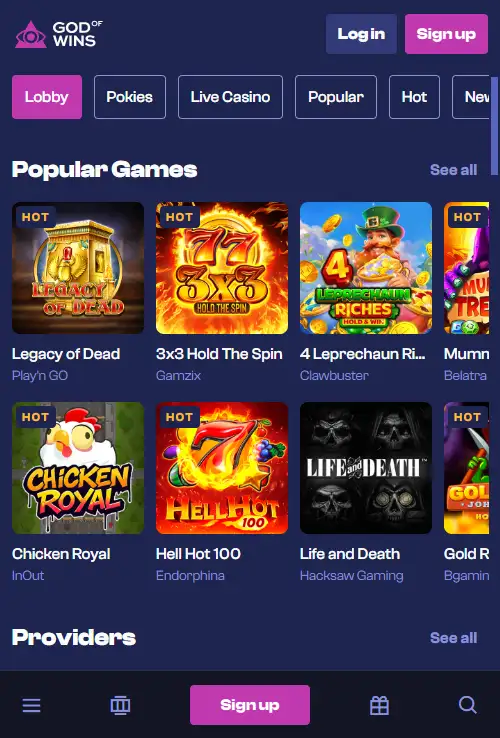
God of Wins supports play through a mobile browser on iOS and Android, so the core route on a phone or tablet is to open the casino site in Safari, Chrome or another modern browser. Current independent sources agree that the browser version is mobile-ready. The native-app picture is less clear: several casino databases report no downloadable iOS or Android app, while some recently published sites using God of Wins branding claim that an app exists. No matching App Store or Google Play listing was confirmed in this check, so this page treats browser access as the verified option and does not present a native app as established.
For an Australian reader, that distinction matters more than whether a home-screen icon exists. The practical questions are whether the lobby works on a smaller display, games launch cleanly, live tables remain usable, account tools are accessible and the cashier can be reached without switching to desktop. Those are the areas this guide focuses on.
Table of Contents
- Mobile browser play is the dependable route
- Is there a God of Wins app for iPhone or Android?
- Using God of Wins on iPhone
- Using God of Wins on Android
- How the game library translates to mobile
- Live casino on a phone needs more bandwidth and screen space
- Mobile payments and cashier access
- Account access and verification on a smaller screen
- Battery, heat and data use are real mobile constraints
- Security checks worth doing on mobile
- When desktop is still the better choice
- When mobile access is a practical fit
- Sources
- Using God of Wins on mobile
Mobile browser play is the dependable route
The strongest evidence supports browser-based mobile access. Australia-focused and international review sources describe God of Wins as working on smartphones and tablets without requiring a download. That means the normal starting point is simple: visit the site in your browser, sign in and use the responsive layout.
A browser-first setup has one practical advantage for a changing casino platform. The user is opening the current web interface rather than relying on an installed version that may lag behind site changes. The same account credentials can be used across desktop and mobile, and the browser route avoids depending on a particular app-store listing.
The broader God of Wins review covers the site as a whole. This page stays focused on how the main features translate to a smaller screen.
Is there a God of Wins app for iPhone or Android?
At the time of this September 2026 check, a native God of Wins app could not be confirmed through a matching public listing in Apple’s App Store or Google Play. Several independent casino review sources explicitly describe the service as browser-based and say no dedicated iOS or Android app is available. At the same time, some recently published third-party sites using God of Wins branding state that an app exists.
Because those signals conflict, this guide does not tell readers to download a native app or provide an app-store link. If an official downloadable app becomes available, the useful evidence would be a current listing tied clearly to the operator or an official God of Wins source that directs users to that listing. Until then, mobile browser play is the verified route.
This also avoids a common mobile-casino problem: mistaking a website shortcut, progressive web shortcut or unrelated similarly named app for an official native application. A home-screen shortcut can look app-like without being a separate App Store or Google Play product.
Using God of Wins on iPhone
On an iPhone, the practical route is Safari or another supported browser. Open the current site, sign in and allow the responsive layout to scale the lobby to the screen. If you use the casino repeatedly, iOS lets you add a website shortcut to the Home Screen. That shortcut does not prove the existence of a native app, but it can reduce the number of taps needed to return to the site.
For actual play, check more than the homepage. Open the games menu, search or filter for a title, launch a game, return to the lobby and confirm that account controls remain reachable. A mobile casino can look polished on its landing page while becoming awkward once a game is open or a cashier overlay appears.
Orientation also matters. Many pokies work comfortably in portrait mode, while live dealer interfaces and some table games may be easier to read in landscape. If controls are crowded, rotate the phone before assuming the game itself is poorly optimised.
Using God of Wins on Android
Android users can take the same browser-first approach with Chrome or another modern browser. The useful test is not the handset brand but whether the site, game provider and browser combination handles the session smoothly. Current review sources describe iOS and Android browser support rather than limiting mobile access to one operating system.
Android browsers also allow home-screen shortcuts, which can create an app-like launch point while still opening the live website. If a site prompts you to install an APK file directly, treat that as a separate decision from normal browser play. No official God of Wins Android package has been verified, so a sideloaded file should not be trusted merely because it carries the brand name.
Keeping the browser and operating system updated is useful for HTML5 casino games because newer browser engines generally handle graphics, audio and touch controls more consistently than outdated versions.
How the game library translates to mobile
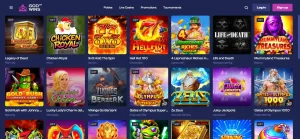
God of Wins has a large game catalogue and current sources confirm that live casino is part of the offer. On mobile, quantity matters less than navigation. A useful interface should let you move between categories, search for a title and resume browsing without repeated full-page reloads or tiny desktop-style menus.
Pokies are usually the easiest category to adapt because most modern titles are built in HTML5 and scale to phone screens. Table games can also work well, but touch targets and information density become more important. For the catalogue itself, including providers and game categories, see the dedicated game library guide.
The practical mobile test is to try the kinds of games you actually intend to use. A phone that handles one lightweight slot well may behave differently with a graphics-heavy title or a live video stream.
Live casino on a phone needs more bandwidth and screen space
God of Wins offers live dealer games, but live casino creates a different mobile workload from ordinary slots. A live table has continuous video, betting controls, table information and sometimes side-bet panels competing for limited screen space. Connection quality therefore matters more.
If the video stalls while the betting timer keeps moving, the experience can become frustrating quickly. A stable Wi-Fi or strong mobile-data connection is preferable, especially for games with short betting windows. Closing other video-heavy apps can also reduce competition for bandwidth and memory.
Before placing meaningful bets, use a low-stakes or observation period to learn where the betting controls, history and menu sit on your screen. The live casino guide explains the live dealer section in more detail without duplicating the full game catalogue here.
Mobile payments and cashier access
A usable mobile casino needs more than games. Players also need access to deposits, withdrawals, account history and verification prompts. Current God of Wins sources describe a range of card, bank, e-wallet and crypto options, but availability can vary by location and transaction direction.
On a phone, check that the cashier clearly separates deposit from withdrawal methods and that any external payment step opens in a way you understand. If a payment flow moves to a banking app or wallet, return to the casino only after the provider confirms the transaction outcome. Avoid repeated taps on a payment button when the first request is still pending.
For method-by-method context, use the payment methods guide. Exact withdrawal limits, fees and processing times are intentionally not repeated here because those details require current primary verification.
Account access and verification on a smaller screen
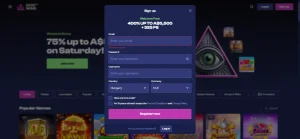
Mobile account management should let you reach profile settings, support and any verification area without switching devices. If the account requests identity verification, a phone can be convenient for photographing documents, but convenience should not replace care. Use only the official account process and make sure images are complete and readable before uploading.
This guide does not publish a fixed God of Wins document checklist or KYC time because those are higher-risk details that can change and require direct source confirmation. The dedicated registration page explains the distinction between verified KYC existence and unverified document specifics.
Battery, heat and data use are real mobile constraints
Casino games can keep the screen bright, animate continuously and use audio, while live dealer games add streaming video. That combination can drain a phone faster than ordinary browsing. Long sessions can also warm the device, which may reduce performance if the phone begins thermal throttling.
Mobile data use is another practical consideration. A few static lobby pages are light, but live video sessions can consume much more data. If your plan has a limited allowance, Wi-Fi may be the better option for extended live play. These device-level constraints are independent of the casino brand, but they have a direct effect on whether mobile play feels reliable.
Security checks worth doing on mobile
- Open the site from a saved, verified address rather than a random advertisement or copied message.
- Use a unique password and protect the email account linked to the casino profile.
- Do not install an APK or configuration profile merely because a page calls it the official app.
- Check the destination carefully before entering card, bank or wallet credentials.
- Avoid keeping an unlocked casino session open on a shared phone.
- Use the site’s own account and support routes when sensitive identity information is requested.
These checks are especially relevant when the native-app status is uncertain. Browser access is already sufficient for the verified mobile route, so there is no need to install an unverified file simply to play on a phone.
When desktop is still the better choice
Mobile is convenient, but some tasks are easier on a larger screen. Comparing long terms, reviewing a detailed transaction history, reading a multi-column table or managing several verification files can be clearer on desktop. The best device can therefore change during the same account journey.
Use mobile for the features that remain comfortable and legible, and switch to desktop when the smaller display makes an important decision harder. That is a more useful standard than assuming that a responsive website makes every task equally good on every device.
When mobile access is a practical fit
God of Wins has verified mobile-browser support for iOS and Android, making the responsive website the reliable way to use the casino on a phone or tablet. The site supports a large games catalogue and live casino, so the important mobile checks are navigation, game loading, stream stability, cashier access and account controls.
A native iOS or Android app is not confirmed here. Independent sources and recent God of Wins-branded pages conflict, and no matching public App Store or Google Play listing was established in this recheck. Use the browser version unless a current official source provides a clearly verifiable app-store destination.
Sources
- AskGamblers – God of Wins Casino review, accessed September 2026 for current brand and mobile context.
- Casino Guru – God of Wins Casino review, accessed September 2026 for mobile interface details, games and current casino information.
- SlotCatalog – God of Wins review, accessed September 2026 for its current no-native-app statement.
Using God of Wins on mobile
God of Wins supports mobile browser play, so the main question is how comfortably the large casino lobby works on a smaller screen. Test search, categories, cashier access, account controls and live chat on the device you plan to use.
For live casino play, stream stability and table controls matter alongside basic page loading. A native app should only be treated as available when current brand information confirms one.